Free · Open Source · Apache-2.0

Who is running, and who is waiting on you

Six AI coding tools on one menu-bar panel. Double-click a row and you are back in that session.

Agent Ping reads the logs and local databases that Qoder, Claude Code, Codex, ZCode, WorkBuddy and OpenCode already write on your machine: who is working, who is queued, who stopped on an error, who is sitting there waiting for an answer, and who just put up a claimable reward. Then it alerts you while you are not looking, and puts that one in front of you.

Zero network calls: the binary has no undefined connect / socket symbols — check it yourself with nm -u. Quota is never looked up online, and the Keychain is never opened.

  • 6
    tools on one screen: Qoder CLI · Claude Code · Codex · ZCode · WorkBuddy · OpenCode
  • 0
    network calls · 0 accounts · 0 telemetry
  • 6
    UI languages out of the box (zh · en · de · it · ja · ko)
  • 2
    platforms sharing one panel and one alert judgement: macOS 13+ and Linux (X11)
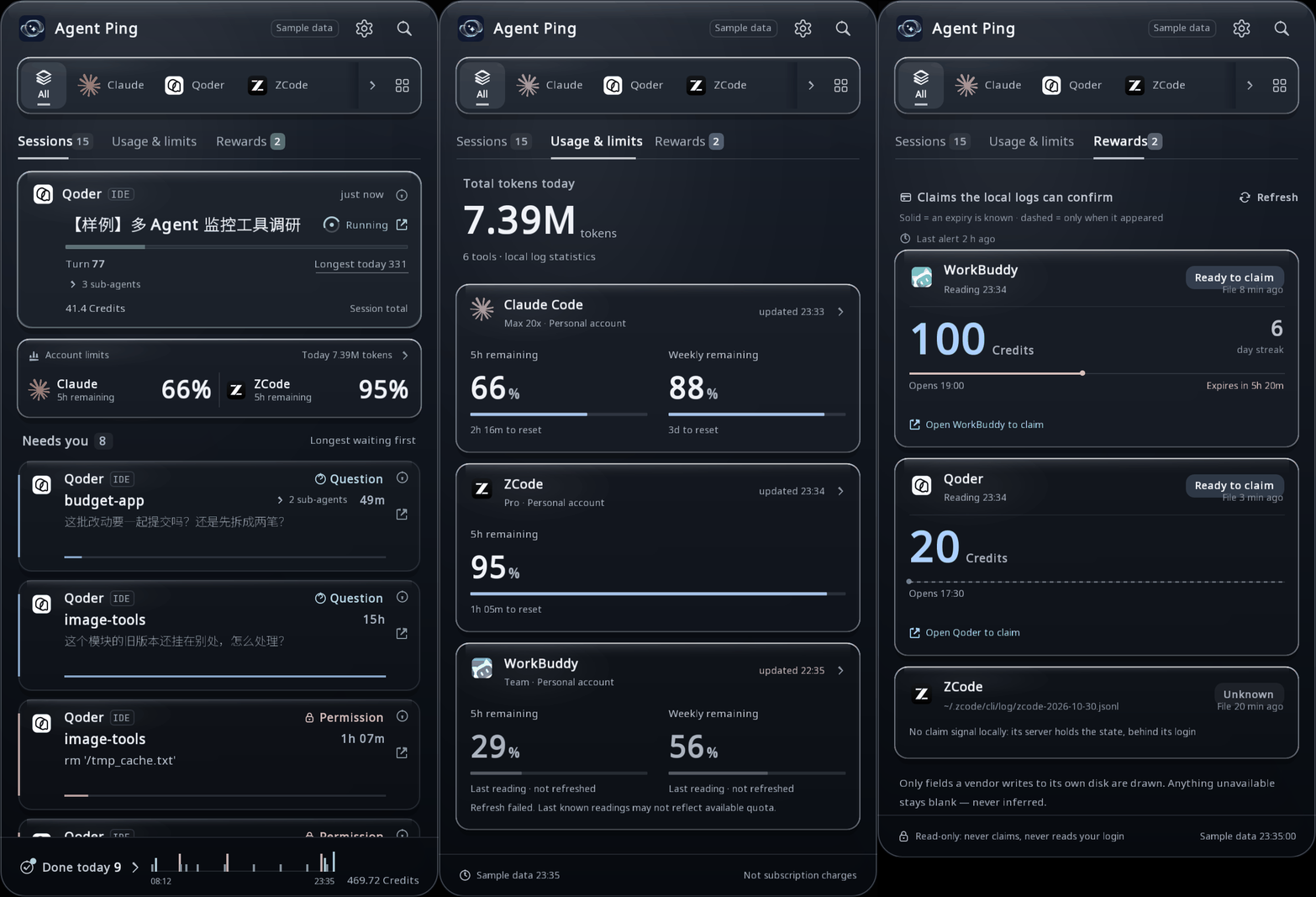
Agent Ping three-screen tour: Sessions overview, Usage & limits quota, Rewards
All three screens are rendered offscreen by the same binary this repository builds (AGENTPING_FIXTURE=1), not staged. The Sample data pill in the header is the product's own label: those numbers come from no real machine. The session titles inside are Chinese — the fixture's sample text is written once, in one language, and the panel only translates its own chrome.

Why Agent Ping

Four things the category does not do

When a reward lands, it is on screen

WorkBuddy's [Checkin], Qoder's [Campaign], ZCode's daily log — the claimable state each vendor writes into its own store, on one screen, claimable-first, with face value, streak and this period's expiry countdown on the card. Tapping the card only brings that vendor's app to the front and says so: this layer never presses Claim for you.

Quota read off the local logs only

The 5-hour and weekly windows and their reset times come from fields each tool writes itself — Codex, for instance, logs rate_limits events while it runs. No billing API, no cookies, no Keychain. A reading older than 10 minutes leaves the first screen and moves to the Usage view with its updated HH:MM stamp, so "we did not refresh" and "that vendor wrote nothing" stay two different answers.

Every number states how it was counted

"Turn 77" counts records of type user that carry no toolUseResult key; "41.4 Credits" is Qoder's own counter field — not money, and vendors without that field contribute 0. Where a source has no field, the cell is not drawn at all: no zero, no dollar estimate. The definition is printed on the panel.

Double-click to jump, and it lands on the session

One mis-click only selects; a row fires on a second click on the same row within 0.5 s. On macOS the landing uses that tool's URL scheme, AppleScript, or drives its own ⌘K palette. Cards never move between re-scans: each session gets a stable sequence number the first time the panel sees it, so nothing slips out from under the cursor.

Category · read live 2026-10-30

Who already stands in this category

Every cell below is copied from that project's own README or site; stars and last-push dates come from the GitHub API on 2026-10-30. A cell that says "not stated" means their document does not say it — that is not a weakness, it is an unverified claim we are not making.

Positioning: One glance at whose turn it is — state, quota and rewards — read only from fields already on your own disk.

Agent Ping (this project)

★ —

macOS 13+ and Linux (X11) · C++/Dear ImGui menu-bar panel · built from the formula in this repo

Tools covered:
Qoder CLI · Claude Code · Codex · ZCode · WorkBuddy · OpenCode
Back to the session:
Double-click a row onto the session (macOS); on Linux it lands on activating the app or opening the working directory
Where quota comes from:
Local logs only, with the reading's age on screen
Network:
None: no connect / socket / getaddrinfo in nm -u, no HTTP client

peon-ping

★ 5,096

macOS · Linux · Windows · WSL2 · SSH · voice packs and banners

Tools covered:
Claude Code, Amp, Copilot, Codex, Grok Build, Cursor, OpenCode, Kilo, Kiro, Kimi, Windsurf, Antigravity and 20+ more, plus any MCP client
Back to the session:
not stated (it gives you voice lines and on-screen banners)
Where quota comes from:
not stated
Network:
downloads sound packs from a registry

CodeIsland

★ 2,528

macOS 14+ · status bar in the MacBook notch · DMG + iPhone/Watch companion

Tools covered:
claims 30+, including Claude Code, Codex, Cursor, Gemini CLI, Qoder, ZCode, WorkBuddy, OpenCode
Back to the session:
"click once to jump to the exact terminal tab", and it answers approvals and questions inside the island
Where quota comes from:
usage stats plus opt-in plan limits (5-hour and weekly)
Network:
Sparkle update checks; with plan limits on it calls api.anthropic.com using your own Claude Code login; optional webhook forwarding

claude-status-bar

★ 722

macOS · menu-bar icon with a dropdown · driven by Claude Code hooks

Tools covered:
Claude Code
Back to the session:
"Precise per-tab focus is in progress" — issue #19 is linked from their README
Where quota comes from:
not stated
Network:
no server; the app is stateless and starts when a Claude Code session does

lockpaw

★ 168

macOS · a lock layer over the screen, on a hotkey

Tools covered:
Claude Code, Codex, Gemini (as listed in their README)
Back to the session:
no jump: the lock screen shows one quiet line per agent, saying who is waiting
Where quota comes from:
not stated
Network:
not stated

muster

★ 72

macOS 13+ · glass menu-bar overlay · DMG + brew cask

Tools covered:
Claude Code, Codex, Cursor
Back to the session:
answers in place instead: ⌥↓ shows why it asks, two presses of ⌥↩ answer them
Where quota comes from:
not stated
Network:
not stated

Agent-Signal-Bar

★ 71

macOS · traffic light plus a floating desktop signal · ad-hoc signed, not notarized

Tools covered:
Codex first (Desktop, CLI/TUI, VS Code, Xcode, IDEA); others via hooks, its CLI or JSON events
Back to the session:
not stated
Where quota comes from:
quota and cost views; the optional features connect to OpenAI and can use local Codex credentials or chatgpt.com browser-session data, stored in the macOS Keychain
Network:
has an online path for quota

your-turn

★ 5

macOS · menu bar · last commit 2026-02-20

Tools covered:
Claude Code
Back to the session:
"brings the right terminal session to front with one click"
Where quota comes from:
not stated
Network:
not stated

Read 2026-10-30. Stars and pushed_at come from https://api.github.com/repos/<owner>/<repo>; everything else is quoted from each repository's README. "not stated" means that document does not contain the claim — not that the feature is missing.

The gap

Rewards: searching reward, claim and check-in across all seven READMEs above returns zero hits (2026-10-30). Quota: two of them do show it, but only by going online or asking for credentials. Reading it off the local logs and stamping how old the reading is — nobody else does that.

Where we are behind

Coverage: CodeIsland claims 30+, peon-ping 20+, we have six. Answering in place: CodeIsland and muster let you reply to the prompt where it sits; we show the verbatim question and its options and then put you back in that session. Remote work: CodeIsland handles tmux, zellij and SSH hosts; we do not. Those are product decisions, not copy.

Why install it anyway

Six tools' state, quota and reward cards from one scan, entirely offline, with no background daemon. It does not touch your config files unless you ask: the hook is written only when you press Connect or run Tools/install_hook.sh yourself, and the target config is backed up with a timestamp first.

Who it is for

People who keep several agents open and switch windows to find out whether one of them is waiting; people who do not want their quota figure to come from a third-party API; and anyone on a Linux desktop running Codex CLI or OpenCode — most of the projects above are macOS only.

What you get

One window, every screen from the same scan round

The rail at the top filters by tool; everything below it is another view over one scan round — whose turn it is, how much quota is left, which reward expires, what finished today.

01

Sessions overview

One running card (turn, sub-agents, session credits), an account quota preview, the Needs-you queue longest-waiting first, and a footer of today's completions with their hourly spread.

02

Usage & limits

Today's token total plus one card per tool: 5h and weekly remaining, when each resets, and what time the reading was taken. When WorkBuddy's refresh fails, the card says Last reading · not refreshed.

03

Rewards

Three vendors' reward cards with whatever is claimable now sorted first: face value, streak and this period's expiry on the card. For the vendor that only reports when a reward appeared, the track is drawn dashed.

04

Detail

Press ⓘ on any row: the verbatim question and its options, or the command that failed.

05

History

Completed sessions, newest first, 12 per page, further pages load as you scroll.

06

Tools

Which collectors exist on this machine and what each one yielded this round, laid out row by row — so an empty vendor tells you whether it is not installed or simply wrote nothing.

07

Alert layer

One alert per (agent, session) key, ledger on disk so a restart does not re-ping the board; at most 4 per round with the rest held rather than dropped; DND suppresses delivery without clearing the ledger. Reward arrivals ride the same ledger under a claim:<vendor>:<period> key, and the banner stays until you dismiss it.

08

Two platforms, six languages

NSStatusItem and the notification centre on macOS; StatusNotifierItem over D-Bus and notify-send on Linux — one code path for the panel, the scan layer and the alert judgement. Six UI languages, fonts baked per size at startup, so CJK is not a bolt-on.

09

Definitions on screen

Every number carries how it was counted and where it came from; the tray's fixed-order counters omit empty slots, and the tooltip says which slot is which.

Install

Three ways in, all free

macOS 13+ uses the Homebrew formula in this repository; Linux (verified on Debian 12) has source builds only — there is no formula for it; Windows is not supported. There is no prebuilt binary to download.

Homebrew (macOS)

Formula/agent-ping.rb lives in this repo and compiles the source at the v0.1.1 tag. The first install needs the Xcode command line tools and takes about a minute on an Apple-silicon Mac. If brew stops with Error: Xcode alone is not sufficient on macOS 26, that is Homebrew's own gate: run xcode-select --install once and retry.

Build on macOS

Dependencies: brew install cmake ninja glfw freetype. Produces build/AgentPing-cpp.app; run Tools/make_bundle.sh once more to package it.

Build on Linux

Debian 12 packages: cmake ninja-build libglfw3-dev libfreetype6-dev libsqlite3-dev libgl1-mesa-dev libdbus-1-dev. Without SQLite3 the build warns and skips ZCode, WorkBuddy and OpenCode.

brew trust runs once: this is a third-party tap, and Homebrew refuses to load a formula from it by short name until you say so. Without it only the fully-qualified dreamofxm/agent-ping/agent-ping works, and brew upgrade agent-ping refuses to run. Afterwards agent-ping is a launcher — the app lives in Homebrew's opt directory rather than /Applications, because Homebrew builds inside a sandbox that cannot write there.

FAQ

Common questions

Claude Code already has notification hooks and Remote Control — why another tool?

Those are single-vendor: hooks only report Claude Code, and Remote Control pushes to your phone through claude.ai's side. Agent Ping watches six at once, three of which (ZCode, WorkBuddy, OpenCode) have no hook channel at all and can only be read from their own local databases. Codex's osc9 notification only fires while its terminal is focused. And the last mile is the landing: after a sound, you still have to find that session yourself.

Does it edit my config files?

Not by default. It writes only when you press the button on the Connect screen or run Tools/install_hook.sh install claude|qoder yourself, in this order: write hook.sh atomically in its own data directory (0755), back the target config up as <config>.bak-agentping-<YYYYmmdd-HHMMSS>, then merge one hooks.Notification entry per matcher and rewrite the config atomically. Codex's notify slot is detected only: if it belongs to another tool, the panel says so and leaves the file alone. The hook itself just copies the CLI's JSON payload into the inbox — it never answers a prompt, and exits 0 even when the inbox is unwritable, because the CLI reads a hook's exit code as a decision.

Why is there no prebuilt binary?

This repository ships none: the formula compiles the source at the v0.1.1 tag. The upside is that anyone can reproduce the exact app on their machine with one command; the downside is a roughly one-minute compile on first install, plus the Xcode command line tools.

Are the quota numbers guesses?

Neither guesses nor lookups: they are fields the tools wrote into their own local logs — Codex, for example, writes rate_limits events while it runs. So an idle tool's reading goes stale, and past 10 minutes it leaves the first screen for the Usage view with its updated HH:MM stamp. A tool without that field gets an undrawn cell, not a zero.

Will it claim rewards for me?

No. The Rewards screen is read-only; clicking a card only brings that vendor's app to the front, and the card states that claiming happens inside that app. ZCode keeps its claim state in a server response and its local logs carry zero signal, so that card only ever says Unknown — that is the ceiling of this path, not a load failure.

Which tools does it support, and how far does Linux go?

Six: Qoder CLI, Claude Code, Codex, ZCode, WorkBuddy and OpenCode — the last three need a build with SQLite3. Linux runs on X11: banners via notify-send, sound picked from paplay / pw-play / ffplay / canberra-gtk-play / aplay / cxplay by what is installed, and a real StatusNotifierItem tray entry when libdbus-1-dev is present. Two things to say plainly: the Linux side was verified inside a Debian 12 container and never on a real KDE/GNOME desktop, and on Linux a banner click does not jump to the session — there is no palette driver.

How do I check that it really makes no network calls?

Run nm -u on a binary you built: there is no undefined connect, sendto, getaddrinfo or socket, and no HTTP client. The only *connect* symbols in the Linux build are dbus_connection_*, which is local IPC. It also does not read the Keychain, environment secrets or shell history.

Do my session titles get uploaded anywhere?

There is nowhere to upload them: no network path exists. But titles are shown on screen and an alert quotes the title verbatim, so treat this panel the way you treat your own terminal scrollback.

Star & Feedback

Found it useful? Leave a star

Agent Ping is a separately maintained open-source project. If it saved you a few window switches, a star on GitHub helps: the more stars it has, the easier the next person running six agents at once finds it.

Feedback goes through Issues too: a tool you want added, a number whose definition is unclear, a jump that landed in the wrong place — Chinese or English, every one gets read. Before filing a bug, check Known limitations in the README: each entry there names its cause.

What it reads, what it writes and when are tabulated in the README; if you would rather verify than trust the table, run nm -u on a binary you built yourself.